



 All Post
How to find the Google Discover Profile “Follow” link for any website
Mar 06, 2026 | Author: Anna Battistella
Learn the exact steps to find the Google Discover Profile "Follow" link for any website. Use this direct URL to help readers subscribe and boost your site's visibility in Google’s personalized feeds.
If you rely on traditional SEO or social media algorithms to drive traffic to your website, you might be missing out on one of the internet's most powerful traffic engines: Google Discover. But what exactly is it, and why are major publishers suddenly obsessed with getting users to "Follow" their Google Discover profiles?
What is Google Discover?
Unlike traditional Google Search, where a user has to actively type in a query to find your website, Google Discover is proactive. It is a highly personalized, AI-driven feed that lives right on the Google app and mobile browsers. It anticipates what users want to read based on their interests and serves them relevant articles, videos, and updates right on their home screen before they even search for anything. Indeed, because it appears on the most heavily trafficked real estate on the internet (the Google app homepage), getting picked up by Discover can result in massive, immediate traffic spikes for your website.
Why the "Follow" Profile changes everything
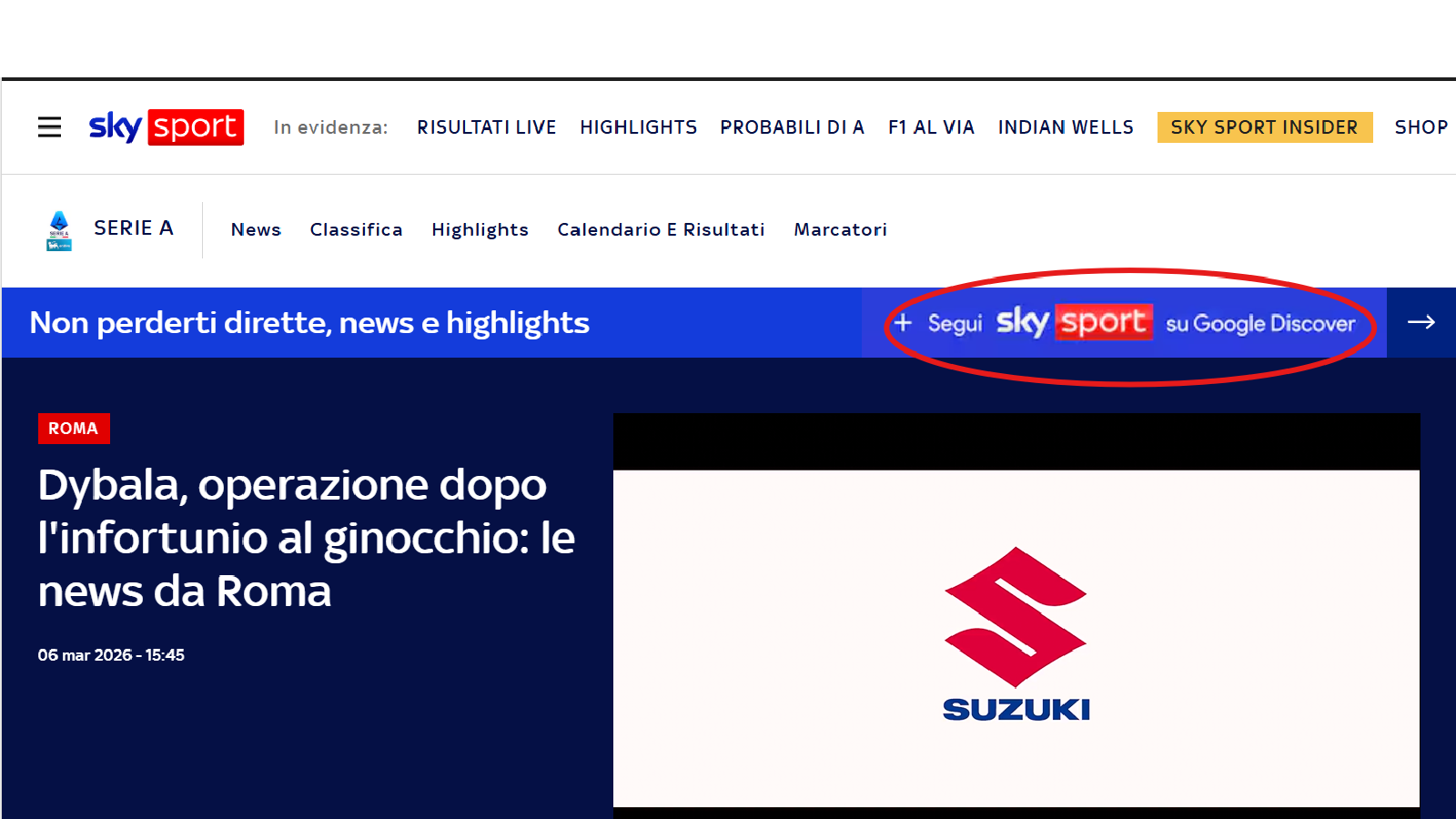
Historically, Discover was purely algorithmic. You just had to hope Google chose to show your article to someone. However, recently, Google rolled out a massive update: The Discover "Follow" feature (look at the Sky sport example).
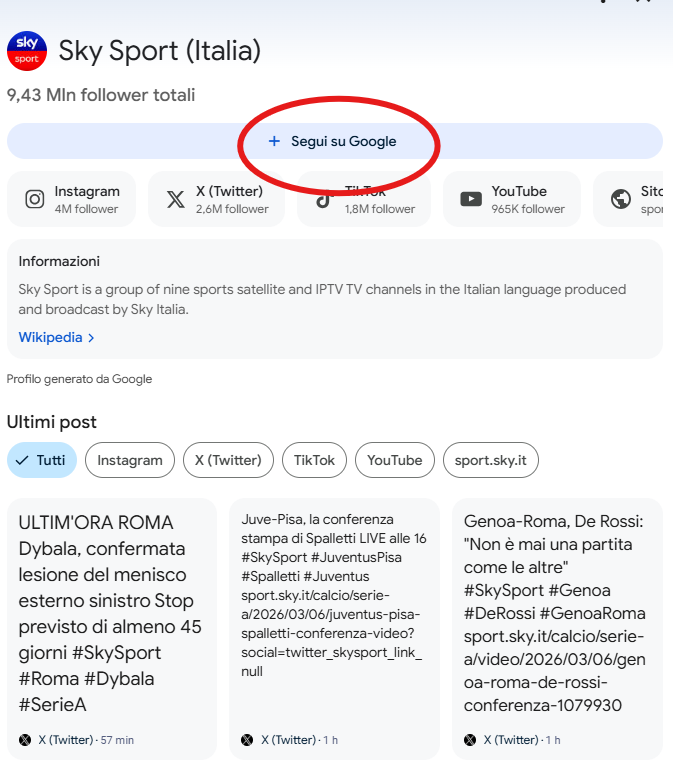
This feature essentially turns Discover from a passive feed into an active subscription service. When a user taps "Follow" on your Discover profile, it creates a dedicated space just for your content. It includes:
- All the website’s info
- A "Follow on Google" button (what a treat!)
- A carousel with related properties: X, Instagram, YouTube, TikTok
- An estimated number of followers for each social media account
- The total estimated number of followers
- Last published articles and posts
More importantly, it explicitly tells Google's algorithm to prioritize your newest articles in that user's feed every time they pick up their phone and it is the holy grail of recurring traffic. Imagine dropping a simple link in your newsletter or social media bios that says: "Want our latest updates instantly? Follow us on Google Discover!" One tap, and your reader is permanently plugged into your content ecosystem.
How to find your direct "Follow" link
Naturally, if you want to build this recurring audience, you need to send your current newsletter subscribers, Twitter followers, or website visitors directly to your Discover profile so they can hit that Follow button. So, how do you find your unique URL? If you try to figure this out yourself, you might assume it's a straightforward process. It seems like you should be able to simply:
-
Log into your Google Search Console.
-
Navigate to the Discover performance tab.
-
Look for a section labeled "Profile Settings."
-
Click a convenient "Copy Follow Link" button and paste it into your newsletter.
But here is the frustrating reality: That button doesn't exist. :(
Google does not provide publishers with a simple, direct URL to their own Discover Follow profile.
The real way to get your link
We realized how much traffic publishers were leaving on the table simply because Google makes this URL nearly impossible to find. We couldn't accept that, so our team did the heavy digging. We figured out the exact method to locate and extract these hidden, direct profile links so you don't have to waste hours digging through developer code or mobile app configurations.
(Note: Not every single website has had a Follow profile generated by Google yet. If yours exists, we will find it.)
Instead of fighting with Google's hidden UI, let us find your URL for you. For free.
Contact us at info@publytics.net
Recent Posts
-
Google Discover Publisher Rankings in August 2026: winners, losers, and major shifts
Sep 17, 2026 | Author: Anna Battistella
-
Google Discover Publisher Rankings in July 2026: winners, losers, and major shifts
Aug 24, 2026 | Author: Anna Battistella
-
Google Discover Publisher Rankings in June 2026: winners, losers, and major shifts
Jul 21, 2026 | Author: Anna Battistella
-
Case Study: How Public Image uses Publytics to track AI visits, Google traffic, and real-time SEO signals
Jul 06, 2026 | Author: Anna Battistella
-
Google Discover Publisher Rankings in May 2026: winners, losers, and major shifts
Jun 15, 2026 | Author: Anna Battistella
Start monitoring your websites in few seconds No credit card required!
Start monitoring your websites in few seconds