



- MCP server
- What the Publytics MCP server is
- Server address
- Authentication
- Client setup
- Claude (claude.ai and Claude Desktop) and ChatGPT
- Claude Code
- Cursor, VS Code and other file-based clients
- Available tools
- Key concepts
- Example questions
- Rate limits
- Notes and troubleshooting
MCP server
What the Publytics MCP server is
The MCP server lets an AI assistant read your Publytics data directly: page views, visitors, sessions, traffic sources, custom events, custom dimensions and realtime activity. Every tool is read-only: the assistant cannot change settings or delete anything.
It works with any MCP-compatible client, including Claude, ChatGPT, Cursor and VS Code. There is nothing to install.
Server address
https://publytics.net/mcp
One address covers every site, custom view and network your account can read, with the same permissions you have in the dashboard. Only sites with an active subscription that are not in overage return data, the same requirement as the API.
Authentication
There are two ways to connect an assistant: signing in with your Publytics account, or pasting an API token.
| Method | Used by | How it works |
|---|---|---|
| Sign-in (OAuth) | claude.ai, Claude Desktop, ChatGPT | You enter the server address and approve access on Publytics. The connection then appears on the API Token page under the assistant's name, followed by "(MCP)". |
| API token | Claude Code, Cursor, VS Code | You create a token on the API Token page and send it as an Authorization: Bearer YOUR_TOKEN header. |
- The assistant sees only the sites, views and networks you can see, with your own roles and network permissions.
- To disconnect an assistant, delete its token on the API Token page.
- Treat the token like a password: don't share it or commit it to public repositories.
Client setup
Claude (claude.ai and Claude Desktop) and ChatGPT
-
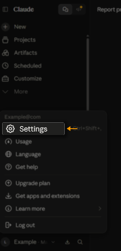
Open the assistant's settings. In Claude: Settings → Connectors → Add custom connector.
-
Enter a name (for example "Publytics") and the address
https://publytics.net/mcp.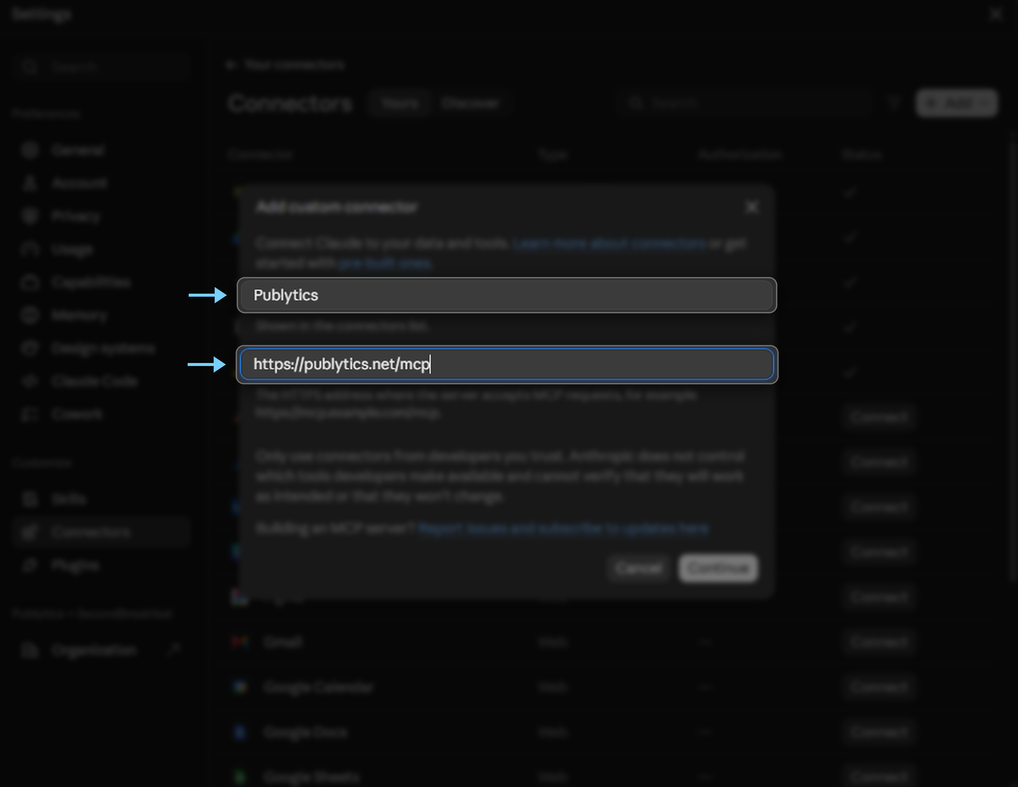
-
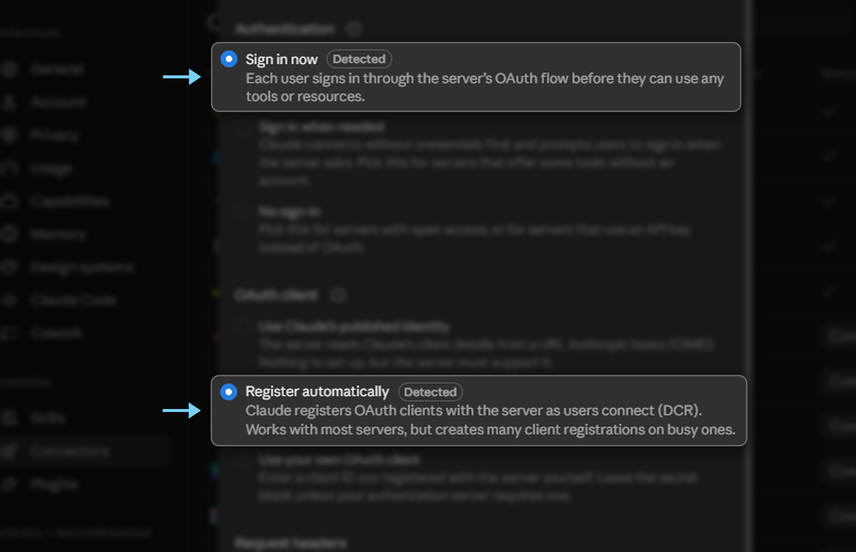
Keep the sign-in settings that are detected automatically (in Claude: Sign in now and Register automatically): no client ID or secret is needed.
-
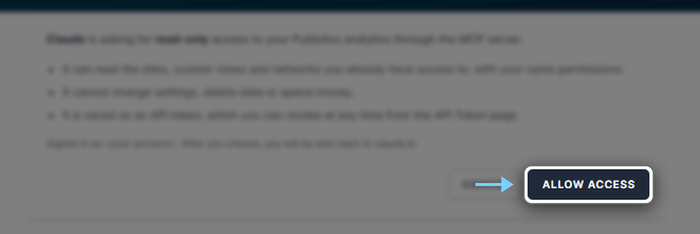
Sign in to Publytics if asked, and click Allow access.
-
Back in the assistant you'll see a connected notice. The connection also appears on the API Token page.

Claude Code
Create a token on the API Token page, then run this command, replacing YOUR_TOKEN:
claude mcp add --transport http publytics https://publytics.net/mcp --header "Authorization: Bearer YOUR_TOKEN"
Cursor, VS Code and other file-based clients
Create a token, then add the server to the client's MCP configuration. Cursor (~/.cursor/mcp.json) and most other clients use this format:
{
  "mcpServers": {
    "publytics": {
      "type": "http",
      "url": "https://publytics.net/mcp",
      "headers": {
        "Authorization": "Bearer YOUR_TOKEN"
      }
    }
  }
}
VS Code (.vscode/mcp.json) uses servers instead of mcpServers:
{
  "servers": {
    "publytics": {
      "type": "http",
      "url": "https://publytics.net/mcp",
      "headers": {
        "Authorization": "Bearer YOUR_TOKEN"
      }
    }
  }
}
Available tools
The server exposes 8 tools. The first two are for discovery, and the assistant usually calls them on its own at the start of a conversation.
| Tool | What it does | Main parameters |
|---|---|---|
publytics_list_sites |
Lists the sites, custom views and networks you can read, with the site identifier the other tools need |
none |
publytics_describe_site |
Timezone, data retention, readable report sections and, for each dataset (content, audience, events, realtime), the accepted dimensions and metrics, custom ones included, with filter operators | site |
publytics_content |
Most-read pages, or content grouped by any dimension (e.g. author): views, sessions, viewers, average time on page, bounce rate | site, group_by, metrics, filters, sort, limit |
publytics_acquisition |
Traffic by referrer source, referrer, UTM parameters, entry and exit pages | site, by, metrics, filters |
publytics_visitors_overview |
Period totals: viewers, views, sessions, bounce rate | site, start, end |
publytics_visitors_breakdown |
Traffic by country, device, browser, operating system or hostname | site, by, metrics, filters |
publytics_events |
Custom events (e.g. newsletter signups, clicks) by event name or by page | site, group_by, filter on name |
publytics_realtime |
Active users or page views in the last few minutes, split by dimension | site, metric, dimensions, range_seconds |
Every report except realtime accepts a period with start and end. Content, acquisition, visitors breakdown and events also accept a comparison period with compare_start and compare_end: rows then also carry compared_<metric> values. Each tool calls the Publytics API and returns its response, so the assistant never has more access than the API gives.
Key concepts
-
The
siteidentifier. Every tool reads one site, view or network, given exactly aspublytics_list_sitesreturns it:Ab12Cd(site),Ab12Cd@15(custom view) ornetwork=3(network). -
Field names. Metrics, dimensions, sort and filters must use the names listed by
publytics_describe_site; any other name is rejected. The site's custom dimensions and custom metrics are included. -
Dates. Format
YYYY-MM-DD, read in the site's timezone. Without dates a report covers the last 7 full days, up to yesterday. Data older than the plan's retention is not returned. -
Filters.
dimensions_filtersandmetrics_filtersare an OR of AND-groups, with the joining words in between. For example, blog pages visited from Italy, or any page reached from Google:[[["pathname","STARTS WITH","/blog"],"AND",["country_code","=","IT"]],"OR",[["referrer_source","=","Google"]]] -
Paging.
limitdefaults to 20, maximum 1,000, withpagestarting at 1. The response says whether more rows may exist (more_rows_may_exist). -
Unique counts. Viewers, unique entrances and unique exits are counted per day. Over a multi-day period they are the sum of the daily values, so someone who returns on different days is counted once per day: they are not distinct people.
Example questions
- Which articles were read most last week, and how long did readers stay on them?
- Did traffic from Google grow compared with the previous month?
- Which UTM campaigns bring the most sessions this month?
- Which pages with more than 1,000 views have the highest bounce rate?
- Which author drove the most page views last quarter?
- How many newsletter signups did we get yesterday, and from which pages?
- What share of traffic comes from mobile in Italy compared with abroad?
- What are people reading on the site right now?
- How do the sites in my network compare over the last week?
Rate limits
Each tool call that reads a site is an API call and counts toward the site owner's hourly API / MCP calls: there is no separate MCP quota. publytics_list_sites is not counted.
| Plan | API / MCP calls per hour |
|---|---|
| Lite | 100 |
| Business | 1,000 |
| Enterprise | 10,000 |
You can check usage on the Plan management page. Once the limit is reached, calls are refused until the start of the next hour. In addition, each user can make up to 30 calls per minute, shared with the API. To save calls, ask for every metric you need in a single request.
Notes and troubleshooting
- A site returns no data: check that it has an active subscription, that it is not in overage, and that your role lets you read it.
- A field is rejected: check the exact name with
publytics_describe_site. - Older data is missing: the requested period goes beyond the plan's retention.
- Lists look incomplete: raise
limitor usepagewhen the response reportsmore_rows_may_exist. - Disconnecting an assistant: delete its token on the API Token page.